Gather a few things See what you’ll need
- Notebook
- Pen
- Calendar
- A short list of actual repeats
Say what causes the next occurrence
Write whether the task repeats on a fixed date, after an interval, or after an event. “Every Friday,” “one month after the last completion,” and “after each workshop” behave differently. A late completion does not automatically change a fixed Friday schedule, while an interval measured from completion may move the next instance.
Use the real requirement for the task rather than choosing whichever rule makes the page easier to draw. A household preference can be flexible; a commitment tied to an event may not be. The notebook should make the chosen rule visible so you can interpret a missed or delayed mark later.
Choose the right kind of repeat record
What creates the next occurrence?
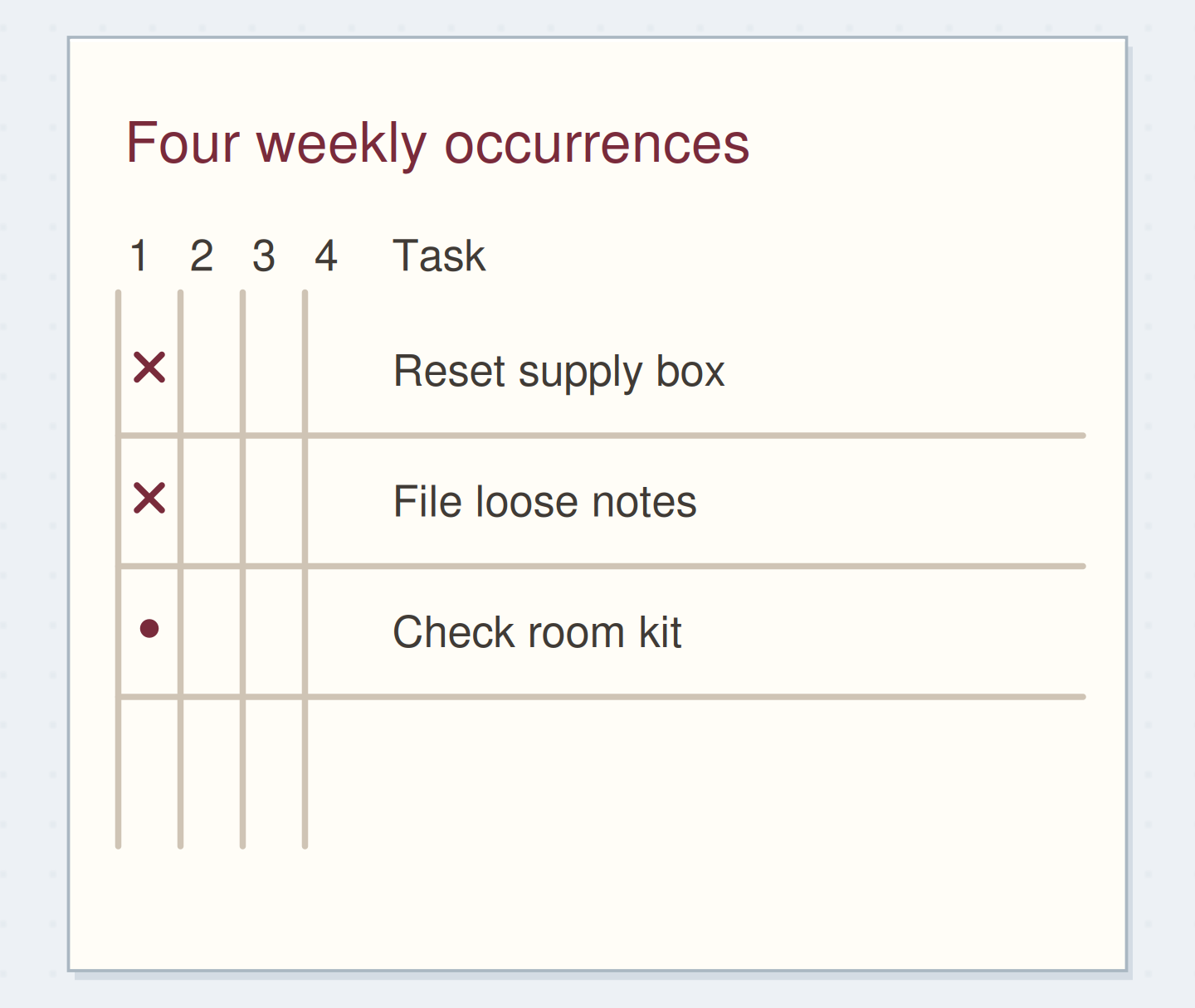
Each named week has a separate cell.
The words stay in one row while the instances remain distinct.
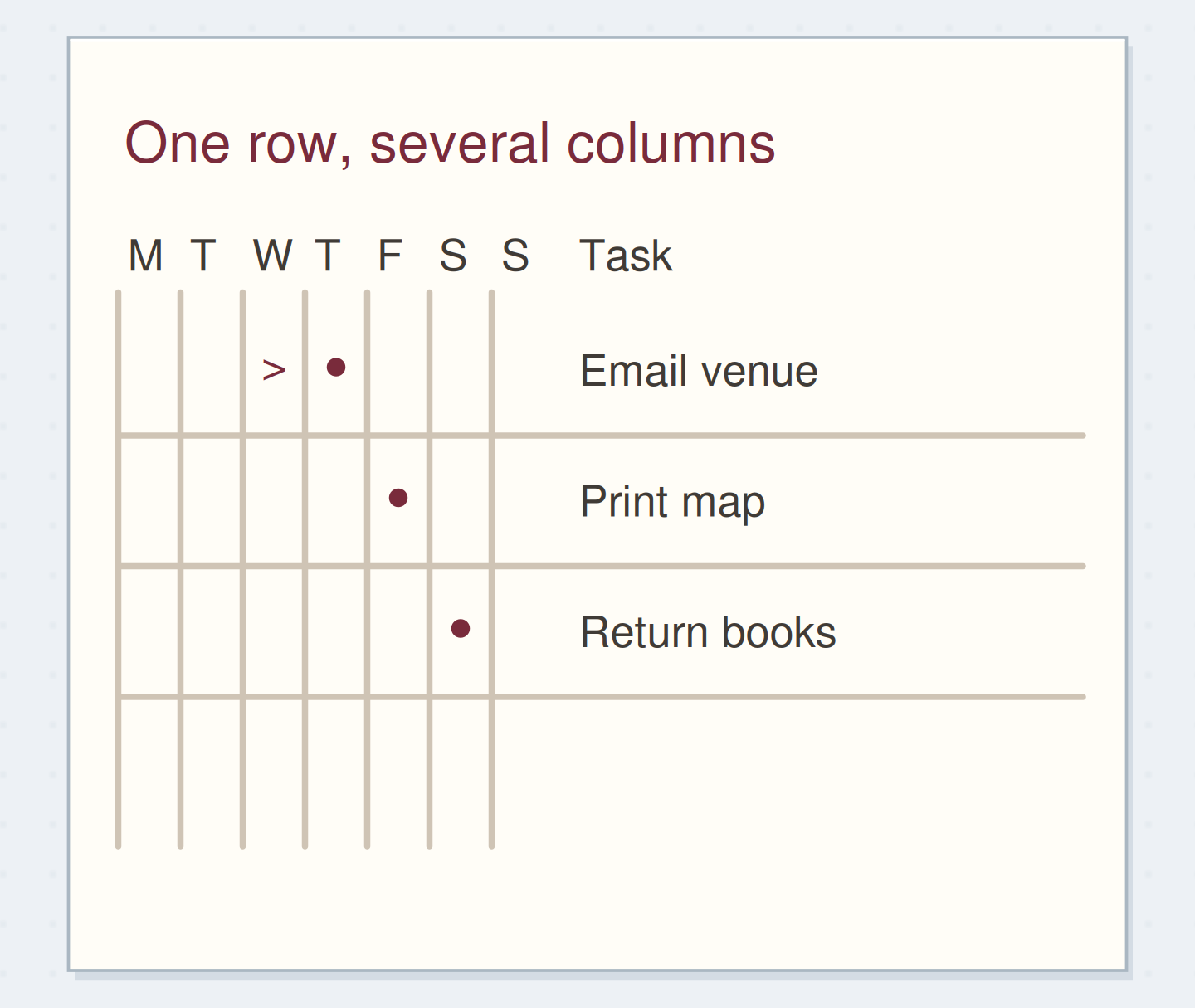
Use one column per relevant period
For a weekly repeat, try a row for each task and a column for each named week. Write the week dates above the columns so “week two” still means something later. Put an open mark where the task is expected and replace it with your completion mark when that occurrence is done.
Community replies to a question about repetitive rewriting suggest this kind of weekly grid. It can reduce repeated wording, but it still needs a review point. A grid at the back of a closed notebook will not remind you on Friday. Add a reference from the page you normally consult if you need the task visible there.
“Stop when one recurring task has a clear trigger, a clear definition of done, and a way to see its next occurrence.”
Keep the instructions beside the short label
A row labelled “reset” may be too vague to use consistently. Write the definition once nearby: “return scissors, refill scrap tray, put ruler in sleeve.” Then the row can use the short label “supply box.” You can keep longer instructions on a separate checklist page and reference it.
Only mark the occurrence complete when your chosen definition is met. If you performed one part, record that part or leave the instance open with a brief note. A completion cell is clearer when it represents a stable action. Do not change the meaning midway through the month without noting the change.
Give a recurring row a stable meaning
Edit the worked example into a note you can use.
Short row label:Supply box
Repeat rule:Every Friday
Done means:Scissors returned, tray refilled, ruler stored
Your words have a place now.
A short label can point to a longer checklist without losing its meaning.
- Words on this card
- 17
Follow the supply-box example
Imagine a four-week grid with rows for supply box, loose notes, and room kit. In the first week, you reset the box and file the notes but have not checked the room kit. The first two cells show completion; the kit cell remains open. The second week has separate cells, so finishing this week's box reset does not erase the earlier record.
If you skip one Friday because there is no workshop, write a small “not needed” note or use a clearly defined cancellation mark. Do not count that as completion. At review, you can see the difference between done, missed, and not required without reconstructing the month from memory.
Choose a log when instances do not fit equal columns
For “wash shared cloths after each workshop,” a last-done line or short dated log may work better than four fixed weekly columns. Record the workshop date and completion date. The next occurrence begins after the next actual workshop, even if several quiet weeks pass in between.
For a completion-based interval, write the next calculated review date after finishing the current instance. Keep the rule alongside it, such as “one month after completion.” If you are unsure how a real requirement should repeat, clarify that requirement first. The layout should follow the rule rather than silently deciding it for you.
Record the miss before choosing what comes next
When you discover an open cell from last week, ask whether the missed instance still matters. Some work can simply be done now; other tasks are tied to an event that has passed and no longer need doing. Keep a brief note if the distinction will matter at review.
Avoid marking both the missed occurrence and the current one complete merely because you did the task once today. That would create a false history. For a flexible routine, you can change the rule going forward and note the date of the change. A page that accurately shows a changed plan is more useful than an uninterrupted row of marks.
Keep one completion from becoming two
Move the reveal control to inspect the specific change.
Two cells marked for one action
A catch-up action should not silently invent a past completion.
Keep the repeat where you will encounter it
Put a reference to the recurring page in your normal weekly setup or calendar check. When the grid fills, carry the rule and any still-relevant open instance into the next period, leaving the completed history in place. Update the instructions if the task itself has changed.
Stop when one recurring task has a clear trigger, a clear definition of done, and a way to see its next occurrence. You do not need to track every ordinary routine. Record the repeats whose absence from view actually causes a problem.
Set up a useful recurring record
Move the steps so the necessary checks happen before the actions that depend on them.
One workable order
- Define the repeat triggerThe trigger determines whether columns or a dated log fit.
- Choose the record that matches itThe page needs a stable interpretation.
- Connect it to a place you checkThe next occurrence must be visible when you need it.
Which check needs to come first?
The example shows one workable order. Other steps can move freely; these checks protect the information you need.
Where this idea began
Want to follow the idea further? These community discussions and maker references are a good place to start.
- How Do You Manage Recurring Tasks?
A reader wants to stop rewriting weekly tasks; replies suggest a reusable grid with separate weekly columns.
- How Do You Handle Repeating Tasks?
Readers ask how paper should handle weekly, monthly, and annual repetitions.